Design with AI, Not by AI: Lessons from a Full App Concept Experiment
- Davide Arcoraci

- Feb 4
- 5 min read
Updated: Feb 10

Can an Entire Application Concept Be Generated by AI?
Short answer: Yes.
Longer answer: Yes.. if you treat AI as a collaborator, not a shortcut.
Over the past year, many design teams have experimented with AI tools to generate UI screens, layouts, and even entire flows. In most cases, the first outcome is a visually pleasant but shallow, something nice to look at, yet detached from real user needs.
This article documents a different kind of experiment: Can an entire application concept from research to an interactive prototype be generated using only AI tools, while still respecting good UX practices?
The results were, honestly, impressive. But not for the reasons you might expect.
The Use Case: Why This Experiment Made Sense
The experiment took place during a short vision-focused design engagement with a large American post-secondary institution, aimed at defining a future-state concept for their internal Grant Management system.
This was not a simple product.
The existing system is:
Highly complex
Strongly dependent on manual human operations
Rich in domain-specific terminology and workflows
From the beginning, we knew the goal was not to deliver a production-ready solution. The outcome was meant to be a conceptual prototype, something that could communicate a future vision, explore possibilities, and align stakeholders.
That made it a good and meaningful space to experiment.
Internally, we had already been exploring AI generative tools for more than a year.
This project felt like the right opportunity to:
Push those tools to their limits
Test a fully AI-assisted design workflow
Start shaping a repeatable internal framework that other designers could use
It’s important to clarify upfront:
We set one rule: AI tools first.
Every application artifact, from research synthesis to mockups, had to be generated using an AI tool.
This constraint forced us to slow down, be more intentional, and rethink how AI fits into the design process, not just where it appears.
The established framework is not set in stone.
It is the result of hands-on experimentation, continuous iteration, and insights drawn from both personal experience and industry references, and it is meant to evolve as tools and practices continue to evolve.
Designing Screens with AI: A Pilot Framework
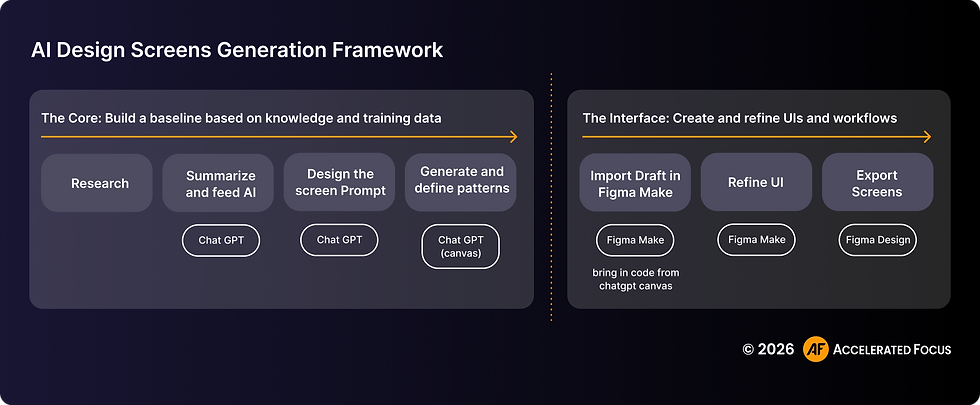
The framework that emerged is divided into two main parts:
1. The Core: Knowledge, Research, and Architecture
This is where the foundation is built:
Research synthesis
Context building
Information architecture
Early pattern definition
This phase is driven mostly in ChatGPT, which acts as a central brain for organizing, summarizing, and structuring knowledge.
2. The Interface: UI Creation and Refinement
This is where ideas become tangible:
Screens
Flows
Visual hierarchy
Interaction details
This phase happens mainly in Figma (still one of the most powerful design environments) and is the shortest bridge to development.
The separation is intentional.
A strong interface cannot exist without a strong core.
Step 1 – Set the Project in ChatGPT

We started by creating a dedicated ChatGPT project.
This might sound trivial, but it was one of the most important decisions in the process.
What happened
All research outputs were collected in one place (documents, notes, data, screenshots)
Findings were summarized and structured
A shared project context was built to support every next step
Why start here?
ChatGPT turned out to be extremely effective at:
Organizing complexity
Holding long-term context
Creating continuity across decisions
Instead of scattered notes and disconnected artifacts, we had a single evolving knowledge base.
Output
Synthesized insights and requirements
A solid foundation for prompt design and screen generation
Step 2 – Generating the Design Concept

With a strong research backbone in place, we moved into concept generation.
What happened
Defined the information architecture of the application
Mapped primary user flows and key scenarios
Generated early, low-fidelity screen structures
Explored multiple layouts and interaction patterns
This phase was still largely handled in ChatGPT, focusing on structure rather than visuals.
Why this matters
By keeping things intentionally low-fidelity, we avoided the classic AI trap: jumping straight to a polished UI without understanding the problem.
Output
Information architecture and core user flows
Low-fidelity screen structures
Step 3 – Refining the Design in Figma Make

Once the concept was clear, we moved into visual refinement.
What happened
Imported code from ChatGPT into Figma Make
Recreated the same screens and flows
Connected the project to an existing design system
Refined layout, spacing, typography, and visual hierarchy
At this point, AI was still heavily involved, but the designer’s judgment became even more critical.
Output
A more polished, design-ready prototype
A strong foundation for interaction design and validation
Step 4 – Exporting Mockups

The final step is almost optional; it focuses mostly on communicating the design outputs using the traditional boards in Figma Design.
What happened
Defined screens representing key user states and flows
Exported screens from Figma Make
Assembled screen flows in Figma Design
Used the mockups for presentation and discussion
Output
Fully editable Figma mockups with Auto Layout
High-fidelity, scenario-specific screens
The Final Output: More Than a “Nice Prototype”

The result was not the typical AI-generated prototype we see in most experiments made by using just a few generic prompts.
It was:
Scenario-driven, based on real user processes and constraints
Built around end-to-end workflows, not disconnected screens
Created to actually work, not just look good
Users could follow realistic paths that reflected actual grant-management scenarios, not just click through disconnected screens.
This required multiple iterations, guiding the AI step by step through each page, state, and transition.
A critical reflection: AI can easily generate interfaces, but UX Design still starts with strong research
One of the strongest learnings from this experiment is also one of the simplest:
AI does not replace UX research. It amplifies it or completely breaks without it.
If research inputs are vague, incomplete, or biased:
AI will make false assumptions not based on the real context
The outputs will often be visually convincing but meaningless for the real users
Important discovery steps such as user interviews, domain analysis, and current-state mapping cannot be skipped. AI can speed them up, summarize them, and help extract patterns, but it cannot invent understanding.
Final Considerations from the Experiment
A few practical lessons stood out:
Learn and use technical terminology. Knowing the correct terminology, especially when generating UI content, is fundamental during the AI prompting process. Precise language enables faster and more accurate UI changes. Incorrect or ambiguous naming of UI elements can easily lead to hours of unnecessary iteration.
Always provide context. Background information and clear goals help AI align its output with the overall vision. For example, I initially underestimated the value of adding visual UI references to my prompts, but in practice, they proved extremely effective for guiding the AI toward the desired result in specific cases.
Set clear boundaries. Explicitly state what should be included and what should be avoided in each prompt. Many AI tools tend to introduce additional elements that were never requested. While this can occasionally lead to interesting insights, more often it results in unnecessary or distracting output.
Understand AI’s capabilities and limits. Knowing what AI can and cannot do helps set realistic expectations. During this experiment, I often realized that I was underestimating AI’s potential because I was still operating within a traditional design mental model. In many cases, AI proved to be significantly more efficient than humans at purely mechanical tasks. Continued hands-on experience with AI will help designers better understand its logic and gradually reduce this gap.
Experiment constantly. Trying different prompts and approaches often leads to unexpected and valuable solutions. We are still in a phase where no AI-driven workflows can be considered industry standards. Even though many AI tools have introduced credit-based limitations that make exploration more expensive, the most effective way to achieve strong results remains testing, iterating, and exploring multiple approaches.
But more important than all the above:
Collaborate with AI.

After this experience, one idea became very clear to me:
Treat AI like a junior coworker.
Someone who can:
Work incredibly fast
Support you across many tasks
Offer ideas and alternatives
But who:
Needs supervision
Sometimes lacks real context understanding
Cannot fully replace your judgment
Use it to challenge assumptions, accelerate exploration, and handle complexity but keep ownership of the decisions.
That’s where meaningful design still lives.




Comments